# Import necessary libraries for optical neural network simulation
import torch
from torch import nn
import svetlanna as sv

# Import units for physical measurements
from svetlanna.units import ureg

# Import MNIST dataset and data transformation utilities
from torchvision.datasets import MNIST
import torchvision.transforms as transforms
from svetlanna.transforms import ToWavefront

# Import visualization tools
import matplotlib.pyplot as plt
from svetlanna.visualization import show_stepwise_forward, show_structure, show_specs
Convolutional Diffractive Network
1. Simulation parameters
This notebook is based on the article “Optical Diffractive Convolutional Neural Networks Implemented in an All-Optical Way” [1] .
… combining the 4f system as an optical convolutional layer and the diffractive networks
Since in [1] there are no details, we took physical parameters from another article [2] , which we used in some previous notebooks.
wavelength = 750 * ureg.um

c_const = 299_792_458 * ureg.m / ureg.s
frequency = c_const / wavelength
neuron_size = 375 * ureg.um

# Grid resolution
Nx = Ny = 200

# Physical dimensions of each diffractive layer
x_layer_size_m = Nx * neuron_size
y_layer_size_m = Ny * neuron_size

print(f'lambda    = {wavelength / ureg.um:.3f} um')
print(f'frequency = {frequency / ureg.THz:.3f} THz')
print(f'neuron size = {neuron_size * 1e6:.3f} um')
print(f'Layer size (in mm): {x_layer_size_m * 1e3 :.3f} x {y_layer_size_m * 1e3 :.3f}')
Output:
lambda    = 750.000 um
frequency = 0.400 THz
neuron size = 375.000 um
Layer size (in mm): 75.000 x 75.000
# Create simulation parameters for the optical system
# These parameters define the spatial grid and wavelength for all simulations
SIM_PARAMS = sv.SimulationParameters(
{
'W': torch.linspace(-x_layer_size_m / 2, x_layer_size_m / 2, Nx),
'H': torch.linspace(-y_layer_size_m / 2, y_layer_size_m / 2, Ny),
'wavelength': wavelength,
}
)2. Dataset preparation
the input image of pixels size was expanded to with zero padding
In this example we will first scale the MNIST images to 100x100 pixels, and then pad them to 200x200 pixels.
# Define transformation pipeline for MNIST images
# 1. Convert to tensor
# 2. Scale to 100x100 pixels to fit within the central region of the diffractive layers
# 3. Pad to 200x200 to match the diffractive layer size
# 4. Convert to wavefront with amplitude modulation
to_wavefront_transform = transforms.Compose(
    [
        transforms.ToTensor(),
        transforms.Resize((100, 100)),  # Scale to 100x100 pixels
        transforms.Pad(
            padding=(50, 50, 50, 50),  # Pad equally on all sides
            fill=0,  # Fill with zeros (no light)
        ),
        ToWavefront(modulation_type="amp"),  # Encode in amplitude channel
    ]
)


# Load MNIST training dataset
training_data = MNIST(
    root="data",
    train=True,
    download=True,
    transform=to_wavefront_transform,
)

# Load MNIST test dataset
test_data = MNIST(
    root="data",
    train=False,
    download=True,
    transform=to_wavefront_transform,
)

print(f"Train data size: {len(training_data)}")
print(f"Test data size : {len(test_data)}")
Output:
Train data size: 60000
Test data size : 10000
# Visualize some examples from the training dataset
n_examples = 4
torch.random.manual_seed(78)
train_examples_ids = torch.randperm(len(training_data))[:n_examples]
fig, axs = plt.subplots(2, n_examples)
for ind_ex, ind_train in enumerate(train_examples_ids):
wavefront, wf_label = training_data[ind_train]
# Show intensity (|E|^2)
plt.subplot(2, n_examples, ind_ex + 1)
plt.title("$|E|^2$")
plt.imshow(wavefront.intensity, cmap="hot")
# Show phase (arg(E))
plt.subplot(2, n_examples, ind_ex + 1 + n_examples)
plt.title("arg($E$)")
plt.imshow(wavefront.angle(), cmap="twilight_shifted")
plt.show()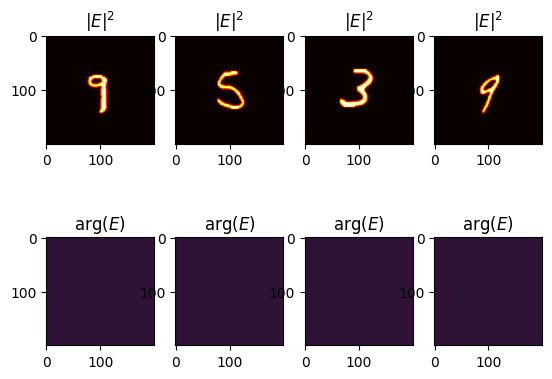
3. Optical Network
Detector
In this example the detector is inherited from the setup in [1] .
… size of these detectors …
In [2] , the authors propose using CrossEntropyLoss. For this purpose, the following values were calculated for each output:
… the measured intensities by D detectors at the output plane are normalized such that they lie in the interval for each sample. With denoting the total optical signal impinging onto the detector at the output plane, the normalized intensities, , can be found by,
# Create detector segments for each digit class (0-9)
# Each detector has size 6.4λ × 6.4λ as specified in the article

def create_segment_mask(x: int, y: int):
    """Create a detector mask at specified position (x, y)."""
    dx = dy = int(6.4 * wavelength / neuron_size)

    res = torch.zeros((Nx, Ny))
    res[
        (Ny - dy) // 2 + y : (Ny + dy) // 2 + y, (Nx - dx) // 2 + x : (Nx + dx) // 2 + x
    ] = 1.0
    return res


d = int(6.4 * wavelength / neuron_size)

# Create 10 detector masks arranged in a specific pattern
# (matching the detector layout from the article)
detector_segment_masks = torch.stack(
    [
        create_segment_mask(-int(2.7 * d), -int(2.7 * d)),  # Detector for digit 0
        create_segment_mask(0, -int(2.7 * d)),              # Detector for digit 1
        create_segment_mask(int(2.7 * d), -int(2.7 * d)),   # Detector for digit 2
        create_segment_mask(-int(3 * d), 0),                # Detector for digit 3
        create_segment_mask(-int(1 * d), 0),                # Detector for digit 4
        create_segment_mask(int(1 * d), 0),                 # Detector for digit 5
        create_segment_mask(int(3 * d), 0),                 # Detector for digit 6
        create_segment_mask(-int(2.7 * d), int(2.7 * d)),   # Detector for digit 7
        create_segment_mask(0, int(2.7 * d)),               # Detector for digit 8
        create_segment_mask(int(2.7 * d), int(2.7 * d)),    # Detector for digit 9
    ],
    dim=-1,
)


# Visualize the detector layout
plt.figure(figsize=(10, 4))
for i in range(10):
    plt.subplot(2, 5, i + 1)
    plt.imshow(
        detector_segment_masks[..., i] + torch.sum(detector_segment_masks, axis=-1),
        cmap="gray",
    )
    plt.title(f"Class {i}")
    plt.gca().set_axis_off()
plt.show()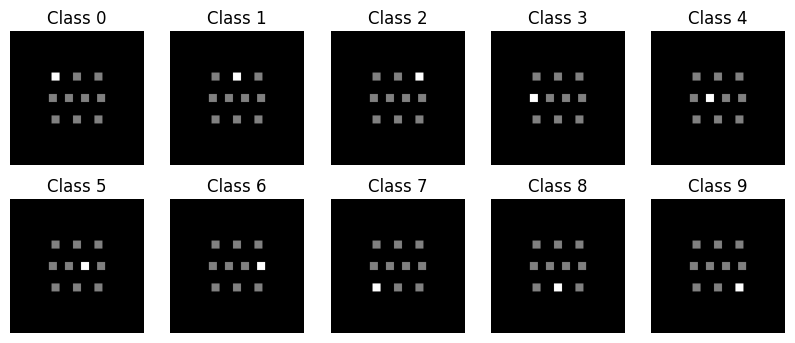
Convolutional layer
To create convolutional layer, we will use three diffrent kernel types:
# ============================
# Gaussian Kernel
# ============================
def gaussian_kernel(size=9, sigma=1.0):
    ax = torch.arange(-size // 2 + 1., size // 2 + 1.)
    xx, yy = torch.meshgrid(ax, ax, indexing="ij")
    kernel = torch.exp(-(xx**2 + yy**2) / (2. * sigma**2))
    kernel = kernel
    return kernel


# ============================
# Laplacian of Gaussian
# ============================
def laplacian_of_gaussian(size=9, sigma=1.0):
    ax = torch.arange(-size // 2 + 1., size // 2 + 1.)
    xx, yy = torch.meshgrid(ax, ax, indexing="ij")
    norm = (xx**2 + yy**2 - 2 * sigma**2) / (sigma**4)
    kernel = norm * torch.exp(-(xx**2 + yy**2) / (2. * sigma**2))
    kernel = kernel - kernel.mean()
    return kernel


# ============================
# Gabor Filter
# ============================
def gabor_kernel(size=9, sigma=2.0, theta=torch.tensor(0), Lambda=4.0, psi=0, gamma=0.5):
    ax = torch.arange(-size // 2 + 1., size // 2 + 1.)
    xx, yy = torch.meshgrid(ax, ax, indexing="ij")
    x_theta = xx * torch.cos(theta) + yy * torch.sin(theta)
    y_theta = -xx * torch.sin(theta) + yy * torch.cos(theta)
    gb = torch.exp(-0.5 * (x_theta**2 + gamma**2 * y_theta**2) / sigma**2) * \
         torch.cos(2 * torch.pi * x_theta / Lambda + psi)
    return gb
kernel_size = 11
kermels = (
gabor_kernel(size=kernel_size, sigma=4.0, theta=torch.tensor(-torch.pi / 7)),
laplacian_of_gaussian(size=kernel_size, sigma=1.0),
gabor_kernel(size=kernel_size, sigma=2.0, theta=torch.tensor(0)),
gabor_kernel(size=kernel_size, sigma=2.0, theta=torch.tensor(torch.pi / 4)),
laplacian_of_gaussian(size=kernel_size, sigma=2.0),
gabor_kernel(size=kernel_size, sigma=4.0, theta=torch.tensor(0)),
gabor_kernel(size=kernel_size, sigma=1.0, theta=torch.tensor(torch.pi / 6)),
gaussian_kernel(size=kernel_size, sigma=1.0),
gabor_kernel(size=kernel_size, sigma=2.0, theta=torch.tensor(torch.pi / 2)),
gabor_kernel(size=kernel_size, sigma=1.2, theta=torch.tensor(-torch.pi / 3)),
laplacian_of_gaussian(size=kernel_size, sigma=5.0),
laplacian_of_gaussian(size=kernel_size, sigma=1.0),
gabor_kernel(size=kernel_size, sigma=6.0, theta=torch.tensor(torch.pi / 6)),
gabor_kernel(size=kernel_size, sigma=2.0, theta=torch.tensor(torch.pi / 3)),
laplacian_of_gaussian(size=kernel_size, sigma=3.0),
gabor_kernel(size=kernel_size, sigma=4.0, theta=torch.tensor(-torch.pi / 3)),
)
# Create a convolutional layer mask by placing the kernels in specific regions of the layer
conv_layer_mask = torch.zeros(Ny, Nx)
for i in range(1, 5):
for j in range(1, 5):
conv_layer_mask[
(- kernel_size) // 2 + i * Ny // 5 : (kernel_size) // 2 + (i) * Ny // 5,
(- kernel_size) // 2 + j * Nx // 5 : (kernel_size) // 2 + (j ) * Nx // 5,
] = kermels[(i-1) * 4 + j-1]
plt.imshow(conv_layer_mask, cmap="gray")
plt.colorbar()
plt.show()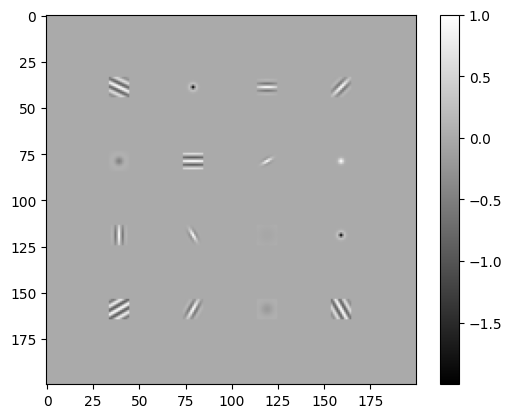
Network
See Figure 2 in [1] !
class Model(nn.Module):
    """
    Diffractive Convolutional Neural Networks for MNIST classification.

    The architecture consists of:
    - 4f system as an optical convolutional layer
    - 1 diffractive layer with phase-only modulation
    - Free-space propagation between layers (40λ distance)
    - Final propagation to detector plane
    - 10 detectors for digit classification
    """

    def __init__(self):
        super().__init__()

        focal_length=20 * wavelength

        elements = [
            sv.elements.FreeSpace(
                simulation_parameters=SIM_PARAMS,
                distance=focal_length,
                method="AS",
            ),
            sv.elements.ThinLens(
                simulation_parameters=SIM_PARAMS,
                focal_length=focal_length,  # Focal length for 4f system
            ),
            sv.elements.FreeSpace(
                simulation_parameters=SIM_PARAMS,
                distance=focal_length,
                method="AS",
            ),
            sv.elements.DiffractiveLayer(
                simulation_parameters=SIM_PARAMS,
                mask=conv_layer_mask,  # Predefined convolutional kernel mask,
                mask_norm=1.0
            ),
            sv.elements.FreeSpace(
                simulation_parameters=SIM_PARAMS,
                distance=focal_length,
                method="AS",
            ),
            sv.elements.ThinLens(
                simulation_parameters=SIM_PARAMS,
                focal_length=focal_length,  # Focal length for 4f system
            ),
            sv.elements.FreeSpace(
                simulation_parameters=SIM_PARAMS,
                distance=focal_length,
                method="AS",
            ),
        ]

        # Create 1 diffractive layers with free-space propagation
        for _ in range(1):
            # Diffractive layer with trainable phase mask
            elements.append(
                sv.elements.DiffractiveLayer(
                    simulation_parameters=SIM_PARAMS,
                    mask=sv.ConstrainedParameter(
                        torch.full((Nx, Ny), torch.pi),  # Initialize with π
                        min_value=0,
                        max_value=2 * torch.pi,  # Phase-only: [0, 2π]
                    ),
                )
            )
            # Free-space propagation using Angular Spectrum method
            elements.append(
                sv.elements.FreeSpace(
                    simulation_parameters=SIM_PARAMS,
                    distance=40 * wavelength,  # Distance between layers: 40λ
                    method="AS",  # Angular Spectrum propagation
                )
            )

        self.setup = sv.LinearOpticalSetup(elements)

    def forward(self, wavefront: sv.Wavefront):
        # Propagate through the optical setup
        wavefront = self.setup(wavefront)
        intensity = wavefront.intensity

        # Calculate total intensity at each detector
        I_l = (intensity[..., None] * detector_segment_masks).sum(dim=(-2, -3))

        # Normalize intensities to [0, 10] range (as in the article)
        I_l_norm = I_l / torch.max(I_l, dim=-1, keepdim=True).values * 10
        return I_l_norm
# Instantiate the optical neural network model
model = Model()# Select an example wavefront from the training data
example_wf = training_data[128][0]# Visualize the structure of the optical setup
show_structure(model.setup)─→┨ ┠─→
─→┃↘
─→┃→
─→┃↗
─→┨ ┠─→
─→▒▒─→
─→┨ ┠─→
─→┃↘
─→┃→
─→┃↗
─→┨ ┠─→
─→▒▒─→
─→┨ ┠─→
# Display specifications of each element in the optical setup
show_specs(model.setup)
<svetlanna.visualization.widgets.SpecsWidget object at 0x14e50c0d0># Show step-by-step propagation through the optical network
show_stepwise_forward(model.setup, input=example_wf, simulation_parameters=SIM_PARAMS)<svetlanna.visualization.widgets.StepwiseForwardWidget object at 0x14e0ec890>4. Training the Network
4.1. Training preparation
DataLoaders
Information from the supplementary material of [1] for MNIST classification:
The training batch size was set to be …
For this task, phase-only transmission masks were designed by training a five-layer with images ( validation images) from the MNIST (Modified National Institute of Standards and Technology) handwritten digit database.
We will use training dataset for training and test dataset for testing, provided with torchvision.datasets.MNIST.
We will use batch size of 128 to speed up the training process.
# Create data loaders for training and testing
batch_size = 128

train_dataloader = torch.utils.data.DataLoader(
    training_data,
    batch_size=batch_size,
    shuffle=True,  # Shuffle training data
    # num_workers=2,  # Uncomment for parallel data loading
    drop_last=False,
)

test_dataloader = torch.utils.data.DataLoader(
    test_data,
    batch_size=128,
    shuffle=False,  # Don't shuffle test data
    # num_workers=2,  # Uncomment for parallel data loading
    drop_last=False,
)
Optimizer and Loss Function
Information from the supplementary material of [1] for MNIST classification:
We used the stochastic gradient descent algorithm, Adam, to back-propagate the errors and update the layers of the network to minimize the loss function.
Additional information from [2] :
… a back-propagation method by applying the adaptive moment estimation optimizer (Adam) with a learning rate of
We will use the Adam optimizer with a learning rate of 5e-3 to speed up the training process.
# Set up optimizer and loss function
optimizer = torch.optim.Adam(params=model.parameters(), lr=5e-3)
loss_fn = nn.CrossEntropyLoss()
Training and evaluation loops
The training loops are direct copy of those presented at torch documentation .
def train_loop(dataloader, model, loss_fn, optimizer):
    size = len(dataloader.dataset)
    # Set the model to training mode - important for batch normalization and dropout layers
    # Unnecessary in this situation but added for best practices
    model.train()

    for batch, (X, y) in enumerate(dataloader):
        # Compute prediction and loss
        pred = model(X)
        loss = loss_fn(pred, y)

        # Backpropagation
        loss.backward()
        optimizer.step()
        optimizer.zero_grad()

        # Print progress every 100 batches
        if batch % 100 == 0:
            loss, current = loss.item(), batch * batch_size + len(X)
            print(f"loss: {loss:>7f}  [{current:>5d}/{size:>5d}]")


def test_loop(dataloader, model, loss_fn):
    # Set the model to evaluation mode - important for batch normalization and dropout layers
    # Unnecessary in this situation but added for best practices
    model.eval()
    size = len(dataloader.dataset)
    num_batches = len(dataloader)
    test_loss, correct = 0, 0

    # Evaluating the model with torch.no_grad() ensures that no gradients are computed during test mode
    # Also serves to reduce unnecessary gradient computations and memory usage for tensors with requires_grad=True
    with torch.no_grad():
        for X, y in dataloader:
            pred = model(X)
            test_loss += loss_fn(pred, y).item()
            correct += (pred.argmax(1) == y).type(torch.float).sum().item()

    test_loss /= num_batches
    correct /= size
    print(
        f"Test Error: \n Accuracy: {(100 * correct):>0.1f}%, Avg loss: {test_loss:>8f} \n"
    )
    return correct, test_loss
4.2 Training and Evaluating
# Track training progress
test_accuracies = []
test_losses = []

# Evaluate the model before training (random initialization)
accuracy, loss = test_loop(test_dataloader, model, loss_fn)
test_accuracies.append(accuracy)
test_losses.append(loss)

# Train the model for specified number of epochs
epochs = 2
for t in range(epochs):
    print(f"Epoch {t + 1}\n-------------------------------")
    train_loop(train_dataloader, model, loss_fn, optimizer)
    accuracy, loss = test_loop(test_dataloader, model, loss_fn)
    test_accuracies.append(accuracy)
    test_losses.append(loss)

print("Done!")
Output:
Test Error:
 Accuracy: 13.2%, Avg loss: 8.135609

Epoch 1
-------------------------------
loss: 8.390922  [  128/60000]
loss: 4.463055  [12928/60000]
loss: 1.318618  [25728/60000]
loss: 0.869712  [38528/60000]
loss: 0.643426  [51328/60000]
Test Error:
 Accuracy: 81.7%, Avg loss: 0.595821

Epoch 2
-------------------------------
loss: 0.603160  [  128/60000]
loss: 0.612661  [12928/60000]
loss: 0.578010  [25728/60000]
loss: 0.523947  [38528/60000]
loss: 0.473807  [51328/60000]
Test Error:
 Accuracy: 87.9%, Avg loss: 0.436734

Done!
Learning Curves (Cross-Entropy Loss and Accuracy)
# Plot learning curves to visualize training progress
fig, axs = plt.subplots(1, 2, figsize=(10, 3))

# Loss curve
axs[0].plot(range(epochs + 1), test_losses, "-o", label="test")
axs[0].set_ylabel("Loss")
axs[0].set_xlabel("Epoch")
axs[0].legend()

# Accuracy curve
axs[1].plot(range(epochs + 1), test_accuracies, "-o", label="test")
axs[1].set_ylabel("Accuracy")
axs[1].set_xlabel("Epoch")
axs[1].legend()

plt.show()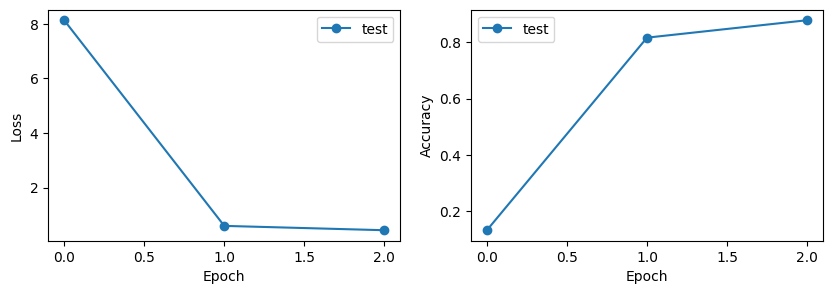
Trained Phase Masks
# Extract and visualize the convolutional layer phase mask and trained phase mask
diffractive_layers = [
    element
    for element in model.setup.elements
    if isinstance(element, sv.elements.DiffractiveLayer)
]

fig, axs = plt.subplots(1, 2, figsize=(8, 4))

for ind_layer, layer in enumerate(diffractive_layers):
    plt.subplot(1, 2, ind_layer + 1)
    trained_mask = layer.mask.detach()

    plt.imshow(trained_mask, cmap="twilight_shifted")
    plt.title(f"DiffractiveLayer {ind_layer + 1}")
plt.show()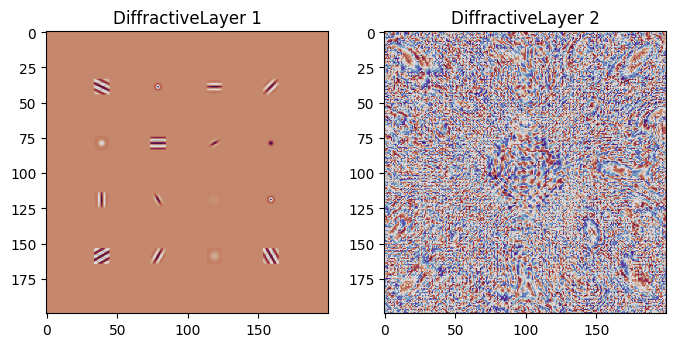
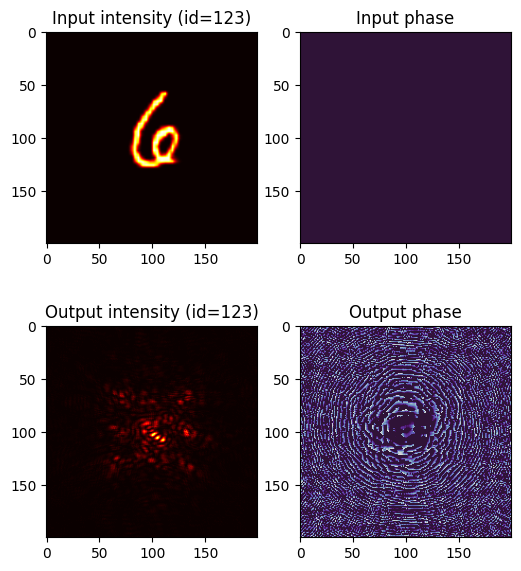
5. Example of Classification
# Select a test sample and visualize the classification process
ind_test = 123

plt.figure(figsize=(6, 7))

test_wavefront, test_target = test_data[ind_test]

# Show input wavefront
plt.subplot(2, 2, 1)
plt.title(f"Input intensity (id={ind_test})")
plt.imshow(test_wavefront.intensity, cmap="hot")

plt.subplot(2, 2, 2)
plt.title("Input phase")
plt.imshow(test_wavefront.angle(), cmap="twilight_shifted", vmin=0, vmax=2 * torch.pi)

# Propagate through the optical network
with torch.no_grad():
    test_wavefront_out = model.setup(sv.Wavefront(test_wavefront))

    # Show output wavefront
    plt.subplot(2, 2, 3)
    plt.title(f"Output intensity (id={ind_test})")
    plt.imshow(test_wavefront_out.intensity, cmap="hot")

    plt.subplot(2, 2, 4)
    plt.title("Output phase")
    plt.imshow(test_wavefront_out.angle(), cmap="twilight_shifted", vmin=0, vmax=2 * torch.pi)

plt.show()


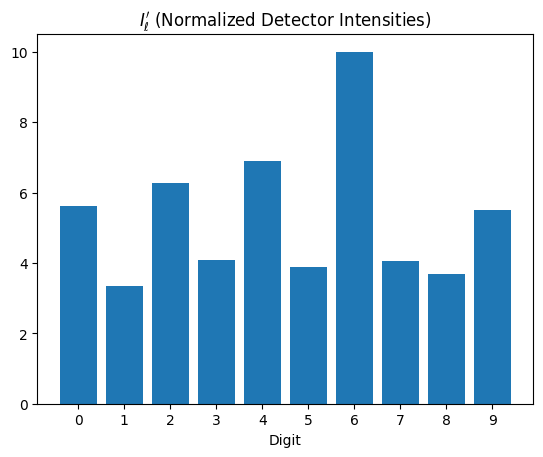
# Display detector responses (classification scores)
with torch.no_grad():
    classes = list(range(10))
    plt.bar(classes, model(sv.Wavefront(test_wavefront)))
    plt.xticks(classes)
    plt.xlabel("Digit")
    plt.title("$I_\ell'$ (Normalized Detector Intensities)")

    plt.show()